- Workforce technology
- Embedded Android
- Biometric interaction
Intellipunch
Making biometric timekeeping fast, clear, and trustworthy
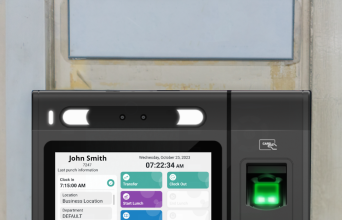
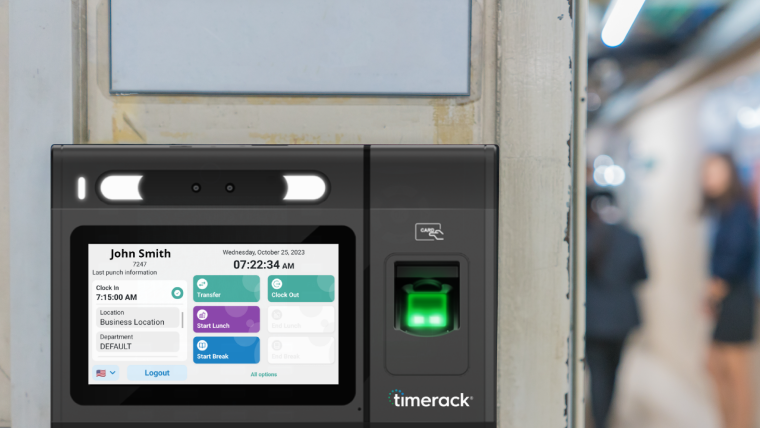
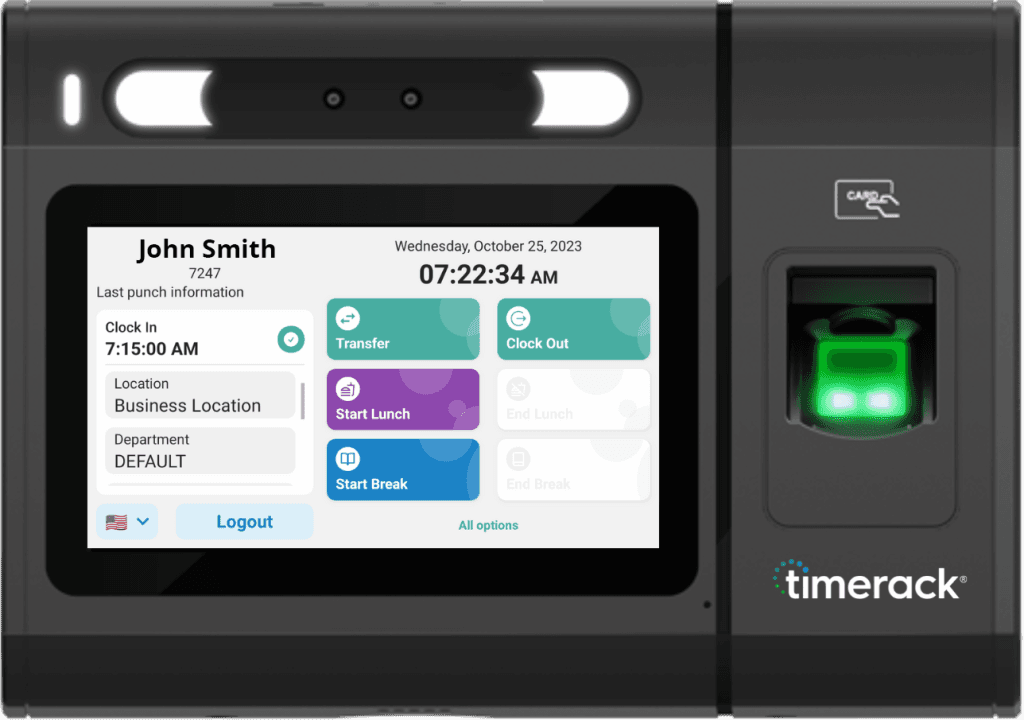
Intellipunch is a time-and-attendance application for a five-inch Android clock, supporting facial recognition, fingerprint scanning, RFID badges, and PIN authentication, with English and Spanish interfaces and offline operation.
I led the UX/UI design and implemented the React Native front end. The initial priority was to deploy a replacement ahead of an anticipated shutdown of the legacy clock server. Subsequent work used field feedback to refine everyday punching, device setup, and recovery flows for workers and administrators.
- Role
- UX/UI Engineer and Front-End Developer
- Company
- Timerack, Raleigh, North Carolina
- Timeline
- Approximately 8 months across two phases
- Status
- In production at Timerack client sites
Some aspects of this project are covered by NDA. Publicly available Timerack interfaces are shown or redrawn for visual consistency. Non-public screens and data have been generalized, and no real employee, biometric, or client data is shown.
The project in brief
The challenge
Timerack needed a replacement for third-party clocks that were difficult to customize, poorly integrated with its systems, and dependent on a server facing an anticipated shutdown.
My contribution
I led UX/UI design and implemented the React Native front end, adapting worker and administrator workflows to a five-inch embedded Android device.
The product
A timekeeping application supporting biometric, badge, and PIN authentication, English and Spanish interfaces, and offline punch recording with background synchronization.
The outcome
The MVP reached client sites ahead of the anticipated shutdown. Subsequent releases expanded and refined the product using feedback from live deployments.
The design challenge
Replacing the legacy clock was not a typical redesign. Business continuity, constrained hardware, sensitive data, and two very different modes of use shaped what the product had to become.
01Continuity
- Pressure
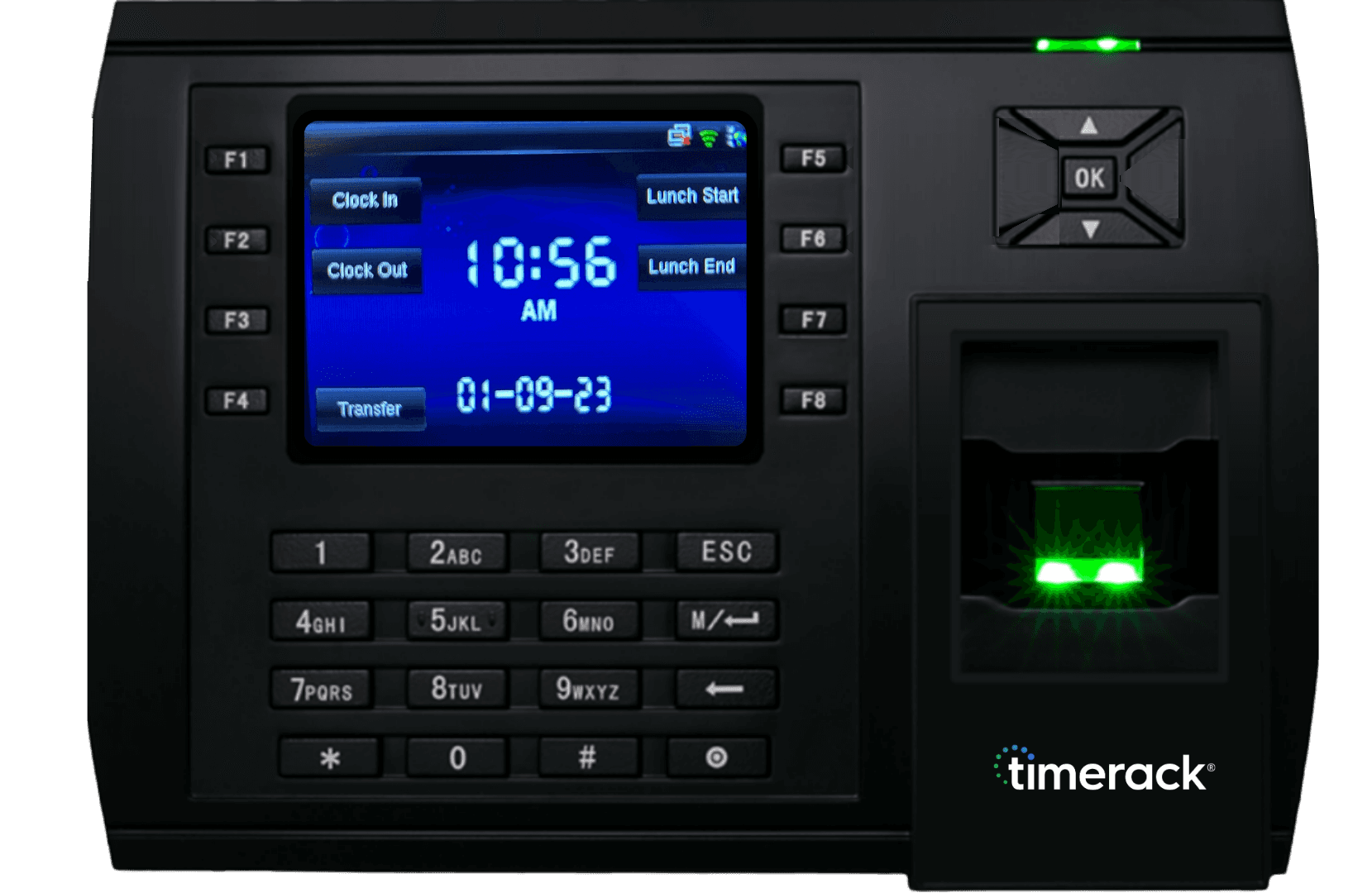
- Anticipated legacy server shutdown. Timerack's third-party clocks, the TR905s, used a manufacturer-defined interface that Timerack could extend only through predefined functions. This limited control over workflows, feedback, and integration with Timerack’s systems.
- Design requirement
- Deliver a stable in-house replacement to active client sites before the anticipated cutoff, then refine it through live deployment.
02Hardware
- Pressure
- Constrained embedded hardware. A five-inch embedded Android device with limited memory constrained interface complexity and performance. Hardware integrations also had limited documentation.
- Design requirement
- Keep interactions lightweight and legible, and validate them on physical hardware.
03Resilience and trust
- Pressure
- Offline operation with sensitive data. Some client sites had unstable or unavailable internet, while punch, employee, and biometric data had to remain secure and recoverable.
- Design requirement
- Preserve records locally and synchronize after reconnecting, with home-screen connectivity indicators and administrator controls for synchronization and recovery.
04Operations
- Pressure
- Worker speed and administrative control. Workers needed to punch quickly and clearly confirm that their attendance had been recorded. Administrators needed tools to set up devices, maintain synchronization, and resolve exceptions.
- Design requirement
- Keep punching focused and easy to understand, with deeper configuration and recovery controls available through separate administrator workflows.
My role across two phases
The project evolved from an urgent functional replacement into a research-informed refinement cycle.
01 · Functional replacement
MONTHS 1-2
Built the first experience
During the first two months, I worked with leadership and engineering to define the minimum requirements, reused Timerack’s existing mobile design patterns, and implemented a functional replacement for the legacy clock. The first version focused on reliable punch in and out, clock authentication, and bilingual support so it could be deployed ahead of the anticipated shutdown.
02 · Post-launch refinement
MONTHS 3-8
Expanded and stabilized the product
Feedback from client deployments revealed usability gaps and additional workflow needs. I designed and implemented expanded biometric and badge authentication flows, offline interactions, device registration, and administrator synchronization feedback. I also refined performance on the physical clock, working with engineering and QA to address issues identified during testing and deployment.
Research and discovery after the MVP
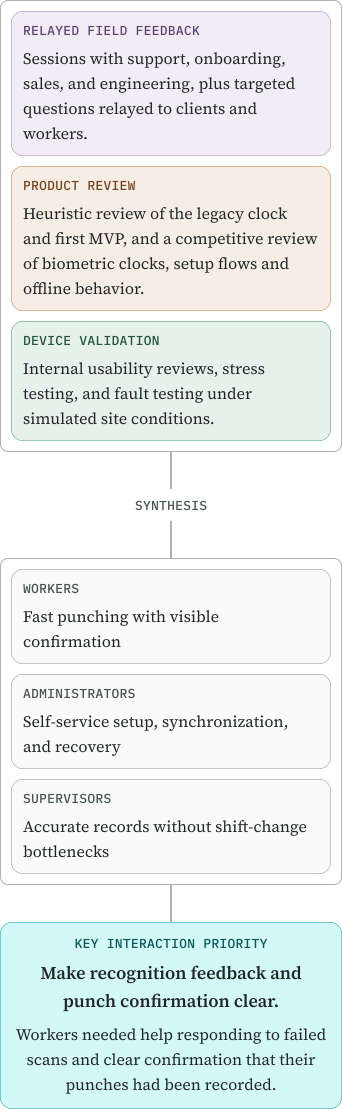
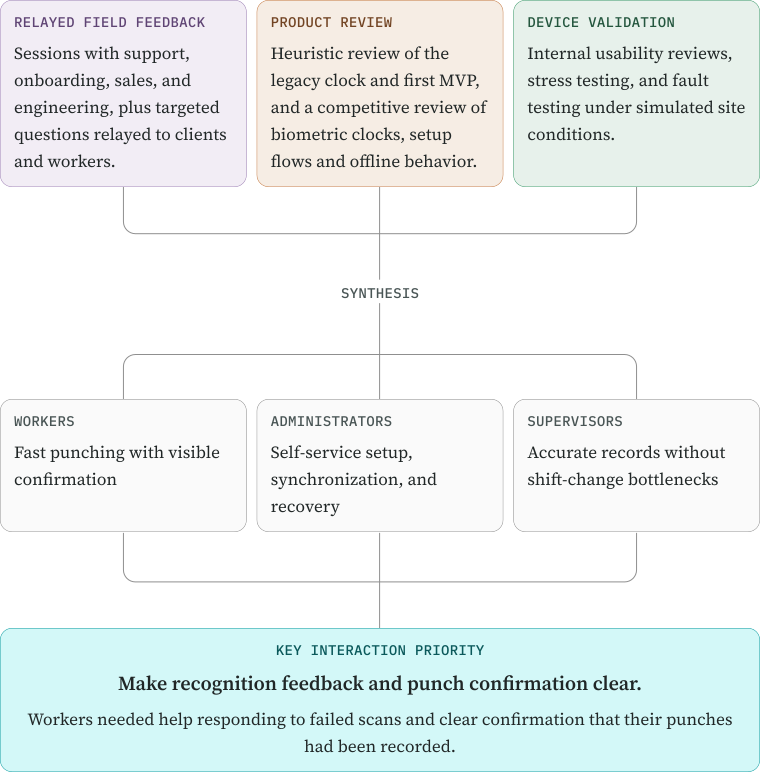
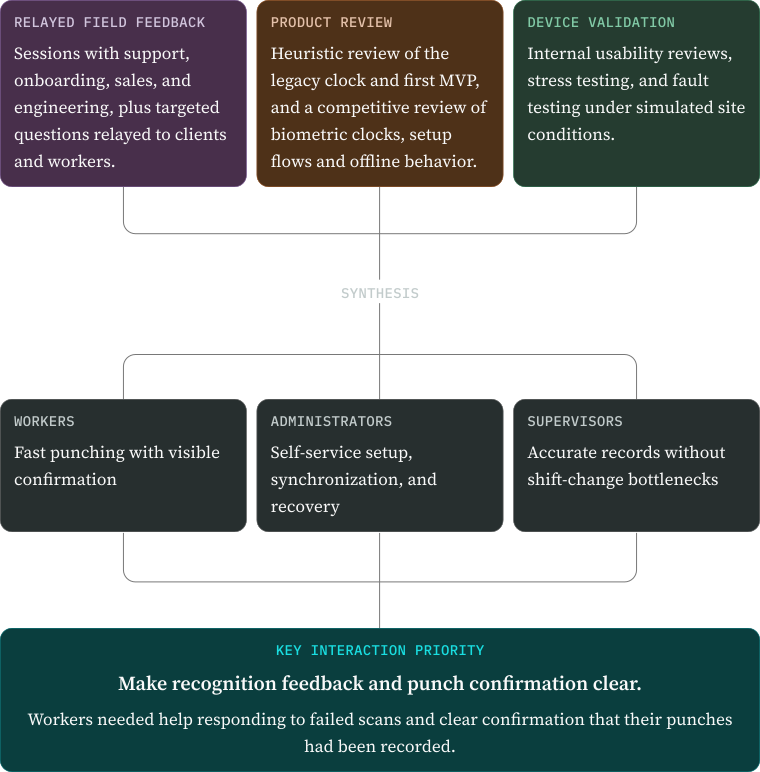
The anticipated legacy server shutdown left little time for research before the first release. After deployment, I combined relayed field feedback, product reviews, and physical-device testing to identify priorities for refinement.
What changed after launch
Client deployments sharpened four priorities for refining the initial replacement.
About the visuals
The workflow screens in this section were recreated for this case study. They preserve the relevant workflows and interaction states while using generalized data and a consistent visual treatment.
01 · Making high-volume punching fast and clear
FINDING
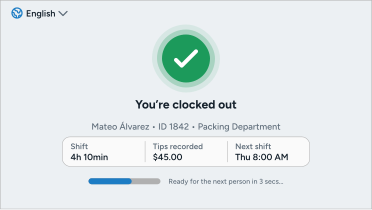
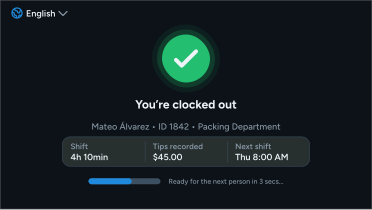
Shift changes could send many workers to the same clock within a short period, so small delays or repeated attempts quickly created bottlenecks. The flow also varied by site. After authenticating, workers might need to choose a punch action, answer an employer-configured question, or report tips before the punch could be recorded.
DESIGN RESPONSE
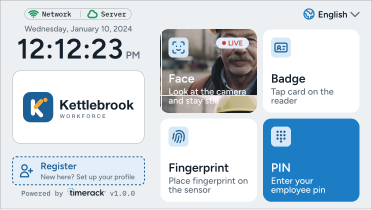
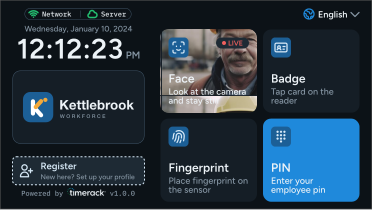
I designed a short, linear sequence that revealed only the steps required for that worker and site. Users moved from an enabled sign-in method to identity confirmation, any configured punch inputs, and immediate confirmation. The complete interaction was targeted to take under ten seconds.
TRADE-OFF
Supporting multiple authentication methods and site-specific punch rules increased the number of paths to build and test. Keeping those interactions responsive on limited hardware also constrained the complexity of animations and visual effects.
01 · Choose a sign-in method
02 · Confirm identity
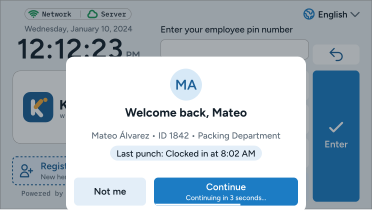
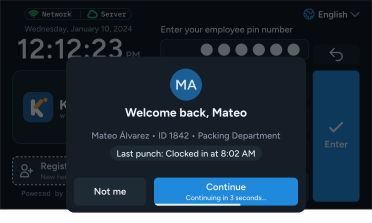
03 · Complete punch requirements
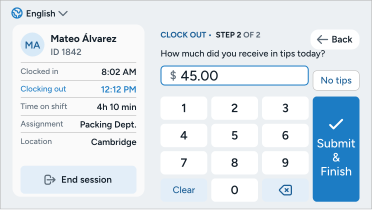
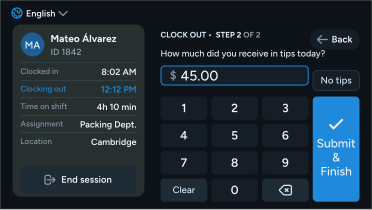
04 · Receive confirmation
02 · Making authentication configurable and recoverable
FINDING
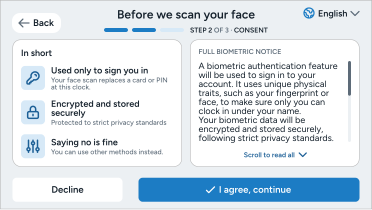
No single authentication method could serve every worker or site. Facial and fingerprint recognition could fail because of positioning, environmental conditions, or sensor limitations. Field deployments also revealed facial-recognition conflicts involving identical twins, showing that biometric matching could identify the wrong worker. Requirements varied by jurisdiction and employer policy, including restrictions on biometric enrollment and the need for notice or consent.
DESIGN RESPONSE
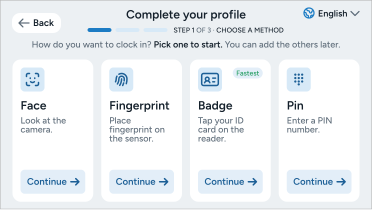
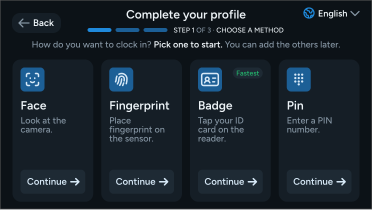
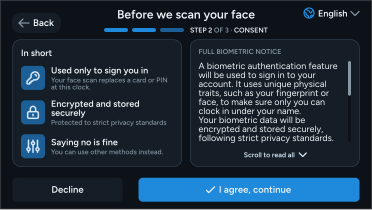
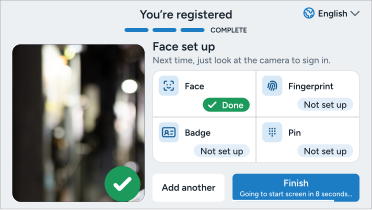
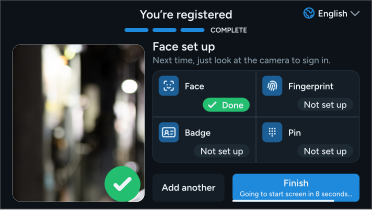
I created a consistent authentication model supporting facial recognition, fingerprint, RFID, and PIN. Administrators could configure the methods available at each site and adjust recognition sensitivity to address matching conflicts. Employers could also enable a consent step before selected biometric enrollment. RFID and PIN provided non-biometric alternatives when biometric use was restricted, declined, unsuitable, or unreliable.
TRADE-OFF
Configurable methods, consent requirements, and recognition thresholds increased administrative complexity, particularly when managers needed to fine-tune biometric matching. I kept the worker-facing flow focused while placing method availability, consent configuration, and sensitivity controls within the credential-protected administrative experience.
01 · Choose an enrollment method
02 · Review biometric consent
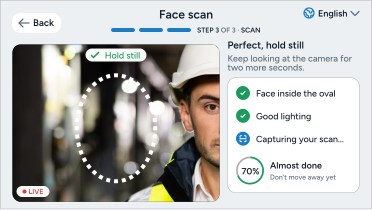
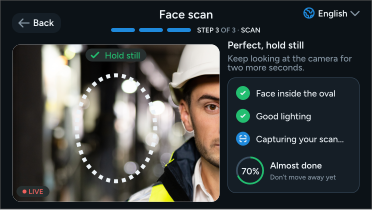
03 · Complete biometric registration
04 · Finish registration
03 · Enabling rapid onsite deployment
FINDING
Sites sometimes needed another clock with little warning. An unexpected influx of workers could require additional capacity, while a malfunctioning device might need to be replaced immediately. Clocks could be added to the customer’s Timerack account by serial number in advance, but onsite staff still needed a reliable way to connect the device and confirm that it had everything required before a shift began.
DESIGN RESPONSE
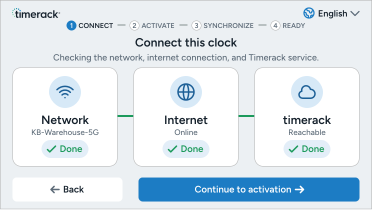
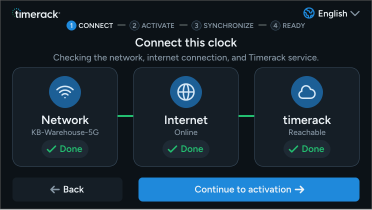
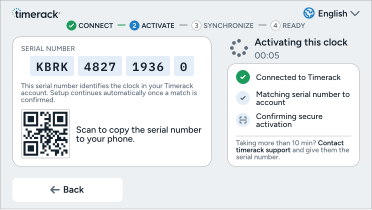
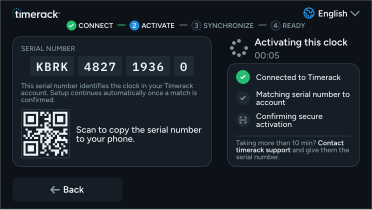
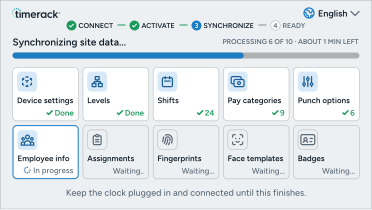
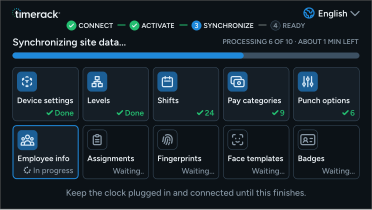
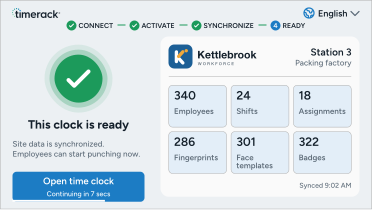
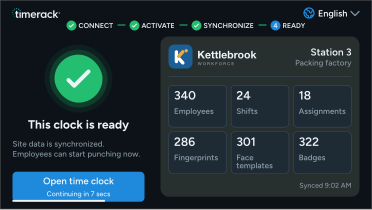
I designed a guided activation flow for clocks already registered to the customer’s Timerack account. Once an onsite manager connected the device to the internet, the clock automatically matched its serial number to the account and downloaded the relevant site configuration, workforce records, assignments, and enabled credentials into local storage. The serial number remained visible during activation so registration errors could be identified quickly. After the initial synchronization attempt, a final summary confirmed that the clock was ready and handed the experience over to the worker-facing punch flow.
TRADE-OFF
Keeping the clock available meant allowing workers to punch before every dataset had downloaded successfully. Failed downloads were retried in the background, while workers whose credentials were unavailable were temporarily treated as new employees. When a synchronization failure was detected, the clock later attempted to match incoming worker records with those already stored locally. Unresolved records were flagged in the portal for manager review. This prioritized continuity during shift changes but could delay reconciliation and require administrative follow-up.
01 · Check the connection
02 · Verify device registration
03 · Synchronize site data
04 · Ready to use
04 · Keeping punching available through connection loss
FINDING
Weak or unavailable internet was common at client sites. Workers needed to record punches and complete registration despite connection interruptions, while administrators needed to keep clock and portal records aligned.
DESIGN RESPONSE
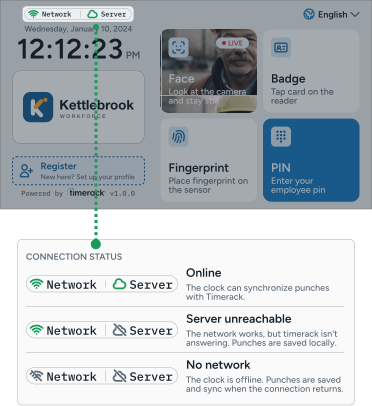
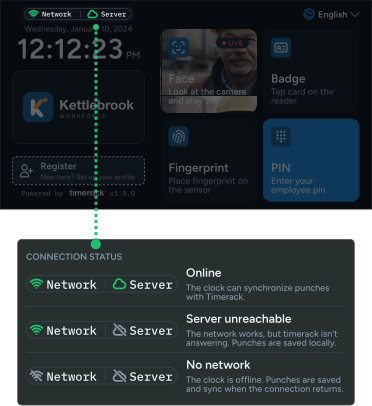
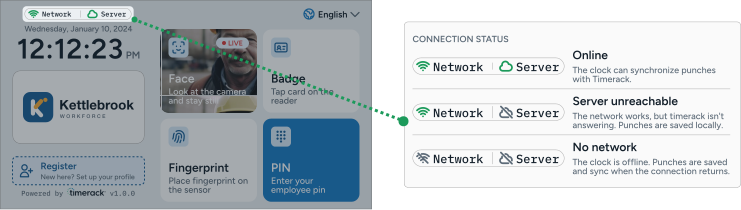
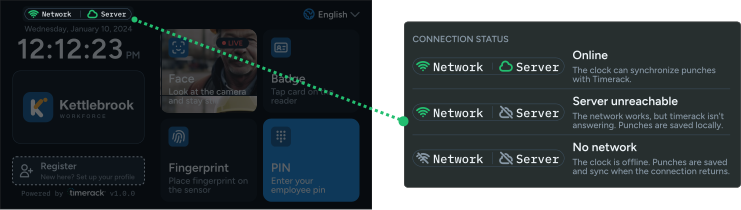
I helped shape a local-first model that saved records on the clock and synchronized them when connectivity returned. Workers received the usual punch confirmation, with small home-screen indicators showing network and server connectivity. I kept synchronization controls, including a manual sync action, in the administrator experience so technical recovery did not interrupt routine punching.
TRADE-OFF
Keeping the clock operational during connection loss meant that locally saved records could temporarily differ from those in the portal, requiring background synchronization and reconciliation. Workers could complete their task without tracking those processes, while administrators handled synchronization issues and unresolved records.
From design to code
I implemented the clock interface in React Native, collaborating with backend engineers on integration. Testing on the physical clock guided refinements to layout, input controls, scan feedback, and performance.
Tools and technologies
- Design
- Adobe Illustrator
- Figma
- Front-end
- React Native
- TypeScript
- React Native Reanimated
- Data and state
- Redux Toolkit
- RTK Query
- React Context
- Local storage
- SQLite
- MMKV
- AsyncStorage
- Native integration
- Custom native bridges
- Java
- RFID
- Fingerprint
- Facial recognition
- Error monitoring
- Bugsnag
- Testing and delivery
- Jest
- On-device testing
- Azure DevOps
- Manufacturer-provided OTA deployment
Implementation decisions
Making facial recognition understandable
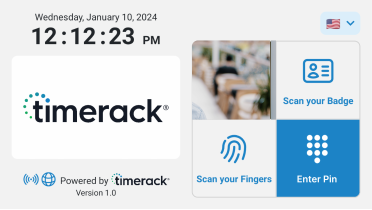
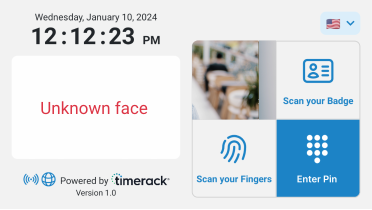
I incorporated a live camera preview that acted as a mirror, helping workers position themselves during sign-in. When scanning problems occurred, temporary messages replaced the main logo, explaining the problem and suggesting adjustments where available, such as moving closer. I used this space to keep feedback visible beside the preview and avoid repeated pop-ups during scanning.
A · Home screen
B · Face not recognized
Designing consistent input controls
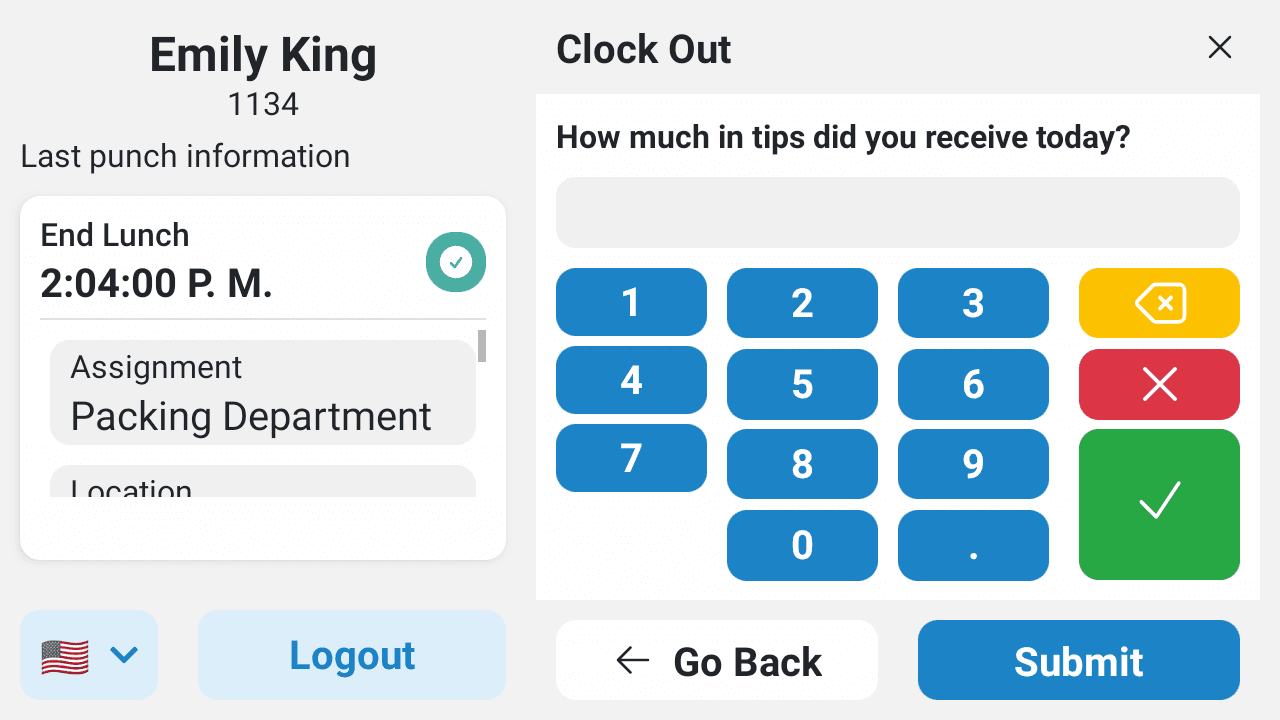
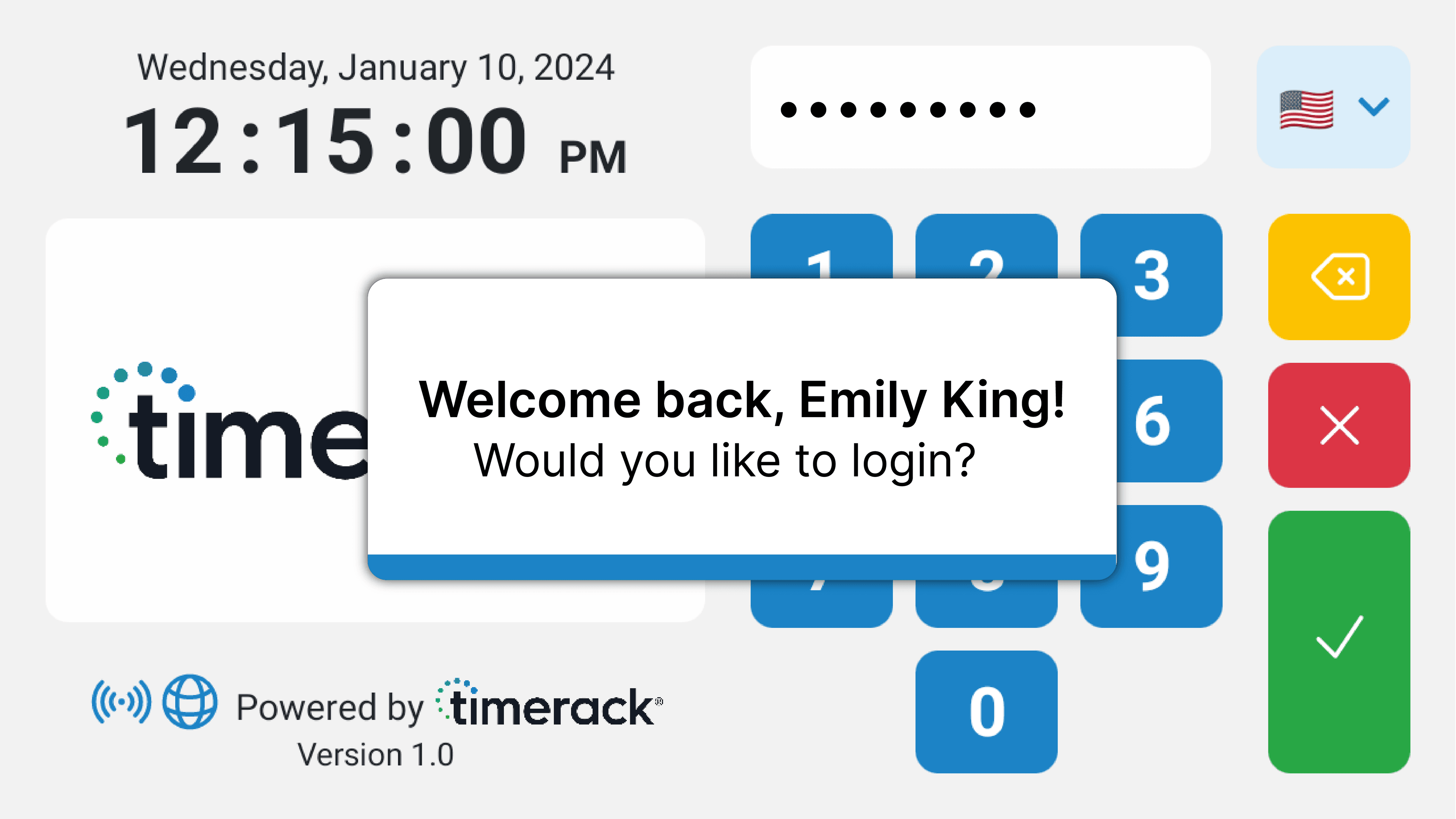
I designed and implemented a custom numeric keyboard and confirmation dialogs suited to the five-inch display. Their layout and behavior followed the same interaction patterns as the rest of the clock, with device testing informing adjustments to text, spacing, and responsiveness.
A · Custom numeric keyboard
B · Sign-in confirmation dialog
Demonstrating physical interactions
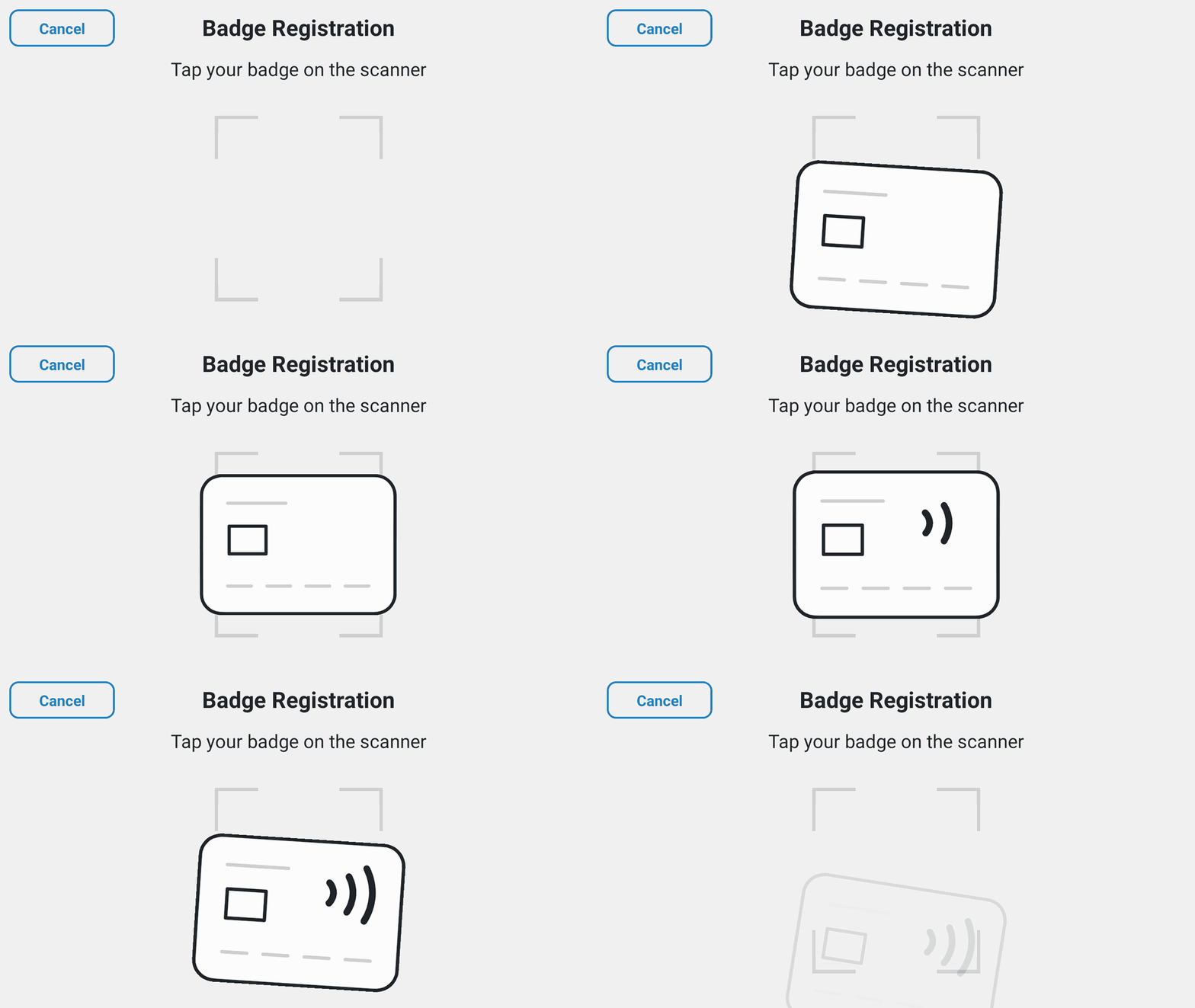
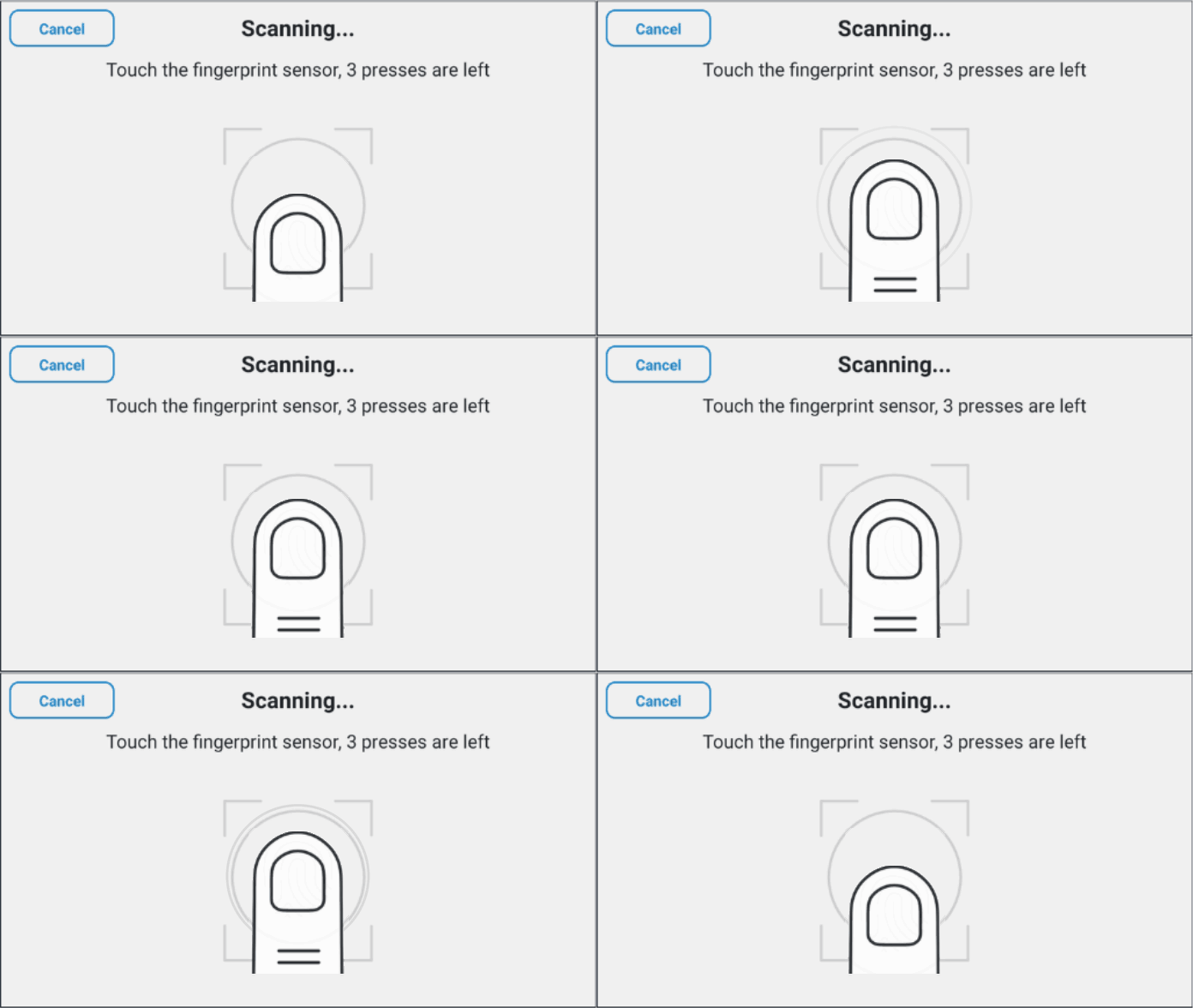
Some registration tasks were easier to demonstrate visually than explain through text alone. I created badge-tapping and finger-placement animations, pairing them with short instructions. Motion was used selectively to explain these actions while keeping routine punching focused and efficient.
A · Badge registration
B · Fingerprint registration
Validation and iteration
Field feedback shaped refinement
Feedback relayed from client sites indicated that some workers repeated punch actions because they were unsure whether their first action had registered. This highlighted gaps in processing feedback and a risk of duplicate punches.
I strengthened processing and completion feedback, clarified synchronization states for administrators, and used field reports to prioritize further refinements.
Testing coverage
Working with QA, I tested:
Authentication
Biometric and RFID scenarios, failed scans, fallback paths, and similar biometric profiles.
Connectivity
Offline operation, synchronization interruptions, and reconnection on physical devices.
Performance
Stress and fault testing on hardware with 2 GB of RAM.
Localization
English and Spanish layouts, including text expansion and readability.
Outcome and project status
The replacement MVP reached client sites ahead of the anticipated loss of legacy clock service. Engineering subsequently fixed the legacy server before the expected shutdown, allowing Timerack to continue supporting TR905. Existing clients are encouraged, but not required, to migrate to Intellipunch, while new clients purchase Intellipunch.
Timerack-reported outcomes
- Software updates: Manual time spent deploying software updates declined by more than 80%.
- Support: Following the refined Intellipunch release, tickets related to clock malfunctions or user confusion declined by nearly half compared with TR905 operation under normal conditions.
- Sales: Intellipunch became one of Timerack's best-selling offerings.
TR905
Intellipunch
Reflection and next steps
What I learned
This project taught me to evaluate speed together with feedback. During busy shift changes, workers needed responsive interactions and clear confirmation that their punches had been recorded.
I am most proud of connecting interface design with implementation to make a complex clock feel straightforward to use. Workers could focus on punching, while administrators had access to the controls needed to manage synchronization and resolve exceptions.
What I would do next
Test workflows across sites
Conduct direct usability sessions with workers across different sites, shifts, and lighting conditions, including night-shift environments.
Broaden biometric test coverage
Extend scenario-based testing of recognition conflicts, failed scans, and fallback methods across a wider range of users and site conditions.
Evaluate accessibility on the device
Audit contrast, touch targets, and readability, then evaluate text scaling and screen-reader compatibility within the clock’s hardware constraints.
CORE TAKEAWAY
On constrained hardware, clarity comes from showing people the feedback and controls they need for their task, with recovery options appropriate to their role.